
01 · Quietly, at work
Speak softly.
Speak softly.
Keep the thought intact.
Push-to-talk means the room hears less, while your Mac gets exactly what you meant.
SiriPlus for macOS · Early alpha
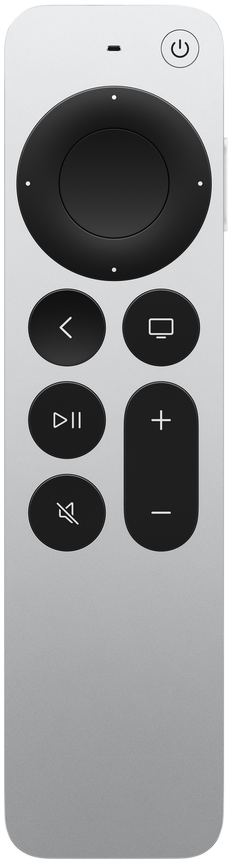
Your ideas move. Your input should too. Turn an Apple Siri Remote into a voice-first control surface for your whole Mac.
A thought starts before you sit down. SiriPlus lets you stay with it.
Wherever you think best
Your desk is only one place ideas happen. Speak quietly, settle into a café, lean back, or pace until the sentence lands.
Push-to-talk means the room hears less, while your Mac gets exactly what you meant.

Small enough for a pocket. Familiar enough to disappear into the way you already work.

Talk, move the pointer, scroll, and confirm without crossing the room.

Keep walking. Keep talking. Your Mac is still with you.
More than dictation
The microphone gets the headline. The clickpad, buttons, and action controls are what make SiriPlus feel complete.
Hold to speak into the app that has focus. Release when the thought is complete.
The clickpad becomes a pocket trackpad for pointing, clicking, dragging, and scrolling.
Speak to Codex, follow the turn, then approve, cancel, or interrupt from the remote.
Made to go with you
It is already comfortable in one hand, already has a microphone and a trackpad, and already knows how to live on a coffee table.
From drawer to Mac
SiriPlus guides the setup and keeps its requirements visible. The early alpha still asks for a few system approvals.
Choose your generation, put it in pairing mode, and connect it over Bluetooth. No Apple TV required.
Accessibility and Input Monitoring enable controls. Voice setup adds the SiriPlus Remote Mic and needs an administrator password.
Press, touch, and speak through the guided checks. If something fails, SiriPlus shows the next recovery action.
Install the alpha
This build is ad-hoc signed and not notarized, so macOS will not recognize its developer. Verify the download first, then follow the exact Gatekeeper recovery path below.
Save the alpha ZIP and its checksum file in Downloads. Open Terminal and run:
cd ~/Downloads
shasum -a 256 -c SiriPlus-alpha-macos-arm64.zip.sha256
Continue only if Terminal ends with “OK.” If it reports a mismatch, delete both files and download them again.
xattr -dr com.apple.quarantine "/Applications/SiriPlus.app"
open "/Applications/SiriPlus.app"
What this does: it recursively removes the Gatekeeper quarantine attribute from this SiriPlus bundle, then opens it. It does not sign, notarize, or prove the app is safe. Use it only for the checksum-verified ZIP downloaded from this page. Prefer Apple’s normal Open Anyway flow when available.
SiriPlus opens Setup Guide on first launch. Choose your remote, pair it, and grant each permission when asked. If you deny one accidentally, enable the installed app under System Settings → Privacy & Security, then quit and reopen SiriPlus.
One administrator approval is expected: Remote Mic setup installs the bundled virtual microphone and Bluetooth capture support. You can defer it for simulator or control-only testing.
Early alpha
Try SiriPlus on an Apple-silicon Mac running macOS 14 or later. This build is for hands-on testers who are comfortable with an unnotarized alpha and guided system permissions.